
How to Secure Your Free Fire Account: Don’t Lose Your ID (2026)
Imagine this: You have played for 2 years. You have the Hip Hop Bundle, the Draco AK, and you finally reached Grandmaster. One morning, you open the game, and your account is gone. Or worse, it says “Account Banned.”
Account security is the most boring but MOST important topic in Free Fire. Every day, thousands of players lose their IDs to phishing scams or lost phones. This guide will ensure your ID stays yours forever.
1. The Danger of “Guest” Accounts
If you are playing on a Guest Account, STOP.
A Guest Account is saved locally on your phone’s storage. If:
- You lose your phone.
- You uninstall the game.
- You clear the game’s data.
- Your phone breaks.
…Your account is gone forever. Garena cannot recover Guest Accounts. There is no cloud backup.
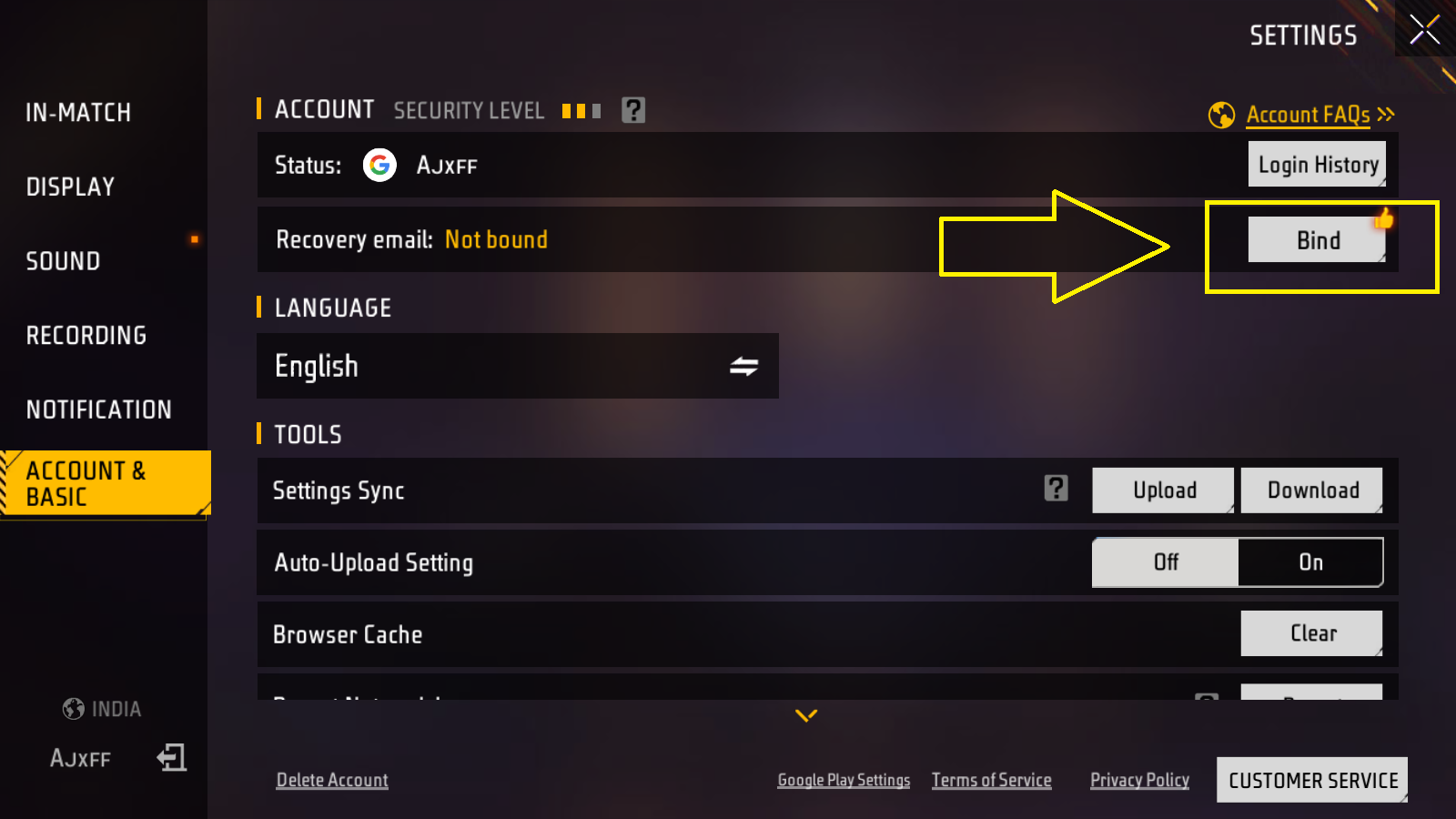
How to Bind/Link Your Account
- Go to Free Fire Settings (Gear icon).
- Under the “Basic” tab, look for “Account.”
- Click “Bind FB,” “Bind Google,” or “Bind VK.”
- Log in with your social media.
Once bound, your data is saved on Garena’s servers. You can login from any phone.
2. Two-Factor Authentication (2FA)
Binding to Facebook is not enough. If a hacker steals your Facebook password, they steal your Free Fire account.
You MUST enable 2FA on your Facebook/Google account.
- Go to Facebook Settings > Security and Login > Two-Factor Authentication.
- Set it up with your phone number (SMS) or Google Authenticator app.
Now, even if a hacker has your password, they cannot login without the code sent to your phone. This makes your account 99.9% hack-proof.
3. The “Phishing” Link Scam
You see a link on WhatsApp or Instagram: “Click here for free 1000 Diamonds and Criminal Bundle!”
DO NOT CLICK IT.
These are phishing sites. They look exactly like the Facebook login page. When you type your password, you are sending it directly to the hacker. Within minutes, they will change your password and steal your ID.
Rule: Only log in on facebook.com or google.com. Never on random sites like “ff-rewards-free.tk”.
4. Buying/Selling Accounts
Buying accounts is against Garena’s Terms of Service. But purely from a security standpoint, it is risky.
The original owner can always recover the account using the “First Top-Up Receipt” or “Creation Date” info via Facebook support, even after they sell it to you. You will lose your money and the account. Stick to creating your own legacy.
5. What if you get banned?
If you used a script, config file, GFX tool, or teamed up with a hacker, you might get suspended.
- Temporary Ban: Usually 3-7 days. Take it as a warning. Remove all third-party apps.
- Permanent Ban: This is final. Garena almost never reverses these.
Protect your investment. Keep your account clean, legitimate, and locked down with 2FA.